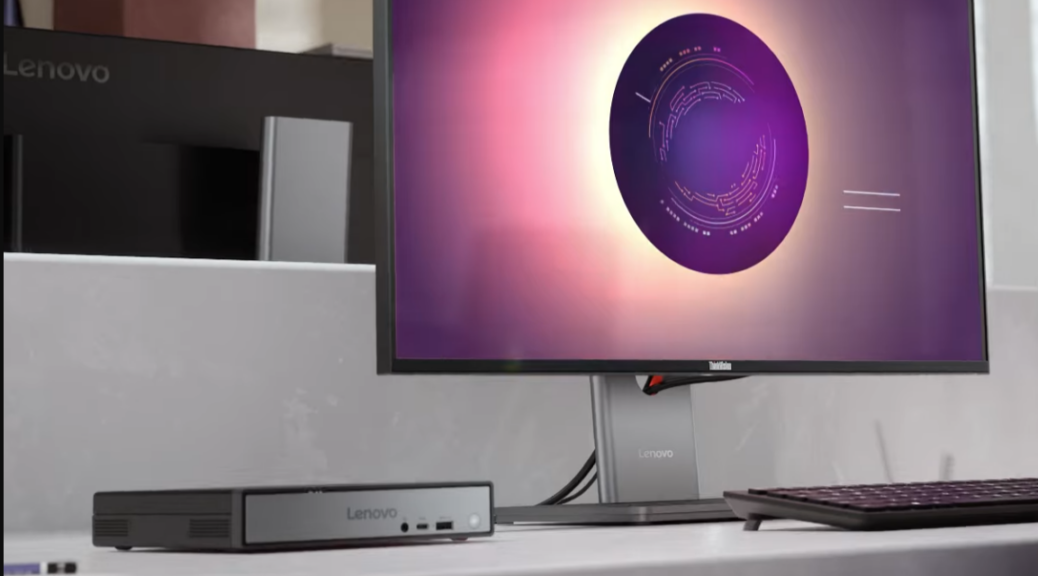
OK, then. I finally got around to unboxing and setting up the 1L (1000 cc) mini PC that Lenovo sent to me a couple of days before Christmas. I’m pleased to say the unit is reasonably speedy, tiny and amazingly quiet in operation. Indeed, the tiny, quiet capable ThinkCenter neo 50q is the first — and only — mini-PC built around Snapdragon X that I’ve been able to lay hands on. First, Qualcomm bailed on its developer kit; second, Geekcom last year promised but never delivered a mini-PC with Snapdragon X innards. Now I finally get to see how this Qualcomm CPU and chipset serves outside the laptop space…
Deets: Tiny, Quiet Capable ThinkCentre neo 50q
It’s a bona-fide Copilot+ PC. Here’s what’s inside (including ports):
- CPU: Snapdragon X X1-26-100 (2.97 Ghz, 8 cores)
- OS: Windows 11 Pro (24H2 Build 26100.7462 delivered)
- RAM: 1x16GB LPDDR5 8448
- NVMe: Samsung OEM 1TB M.2 2280 PCIe Gen4 TLC Opal
- Wi-Fi: Qualcomm Wi-Fi 6E & Bluetooth 5.3
- Dimensions: 179×182.9×36.5mm (Lenovo says “1L”; it’s ~1.2L)
- Front ports: USB-A (10Gbps), USB-C (10 Gbps), mini-RCA
- Rear ports: 4xUSB-A (10 Gbps), HDMI 2.1, DP 1.4a, GbE (RJ-45)
What’s startling here is no high-speed USB-4 (or 5) ports. No Thunderbolt, either. That means no high-speed video links via USB-C. That’s not great. But it also means no access to USB4 or Thunderbolt 4 docks from this unit. That’s not great, either.
A similarly equipped unit, but with 32GB RAM (not 16GB) goes for US$559 at the Lenovo Store right now. That seems like a good value proposition for a machine like this one. That said, I don’t understand why USB4 is MIA from this unit, even if only through a front port. On the plus side, there’s an open M.2 2280 NVMe slot into which you can plug another drive.
Initial Impressions: Speed, Capacity & Oomph
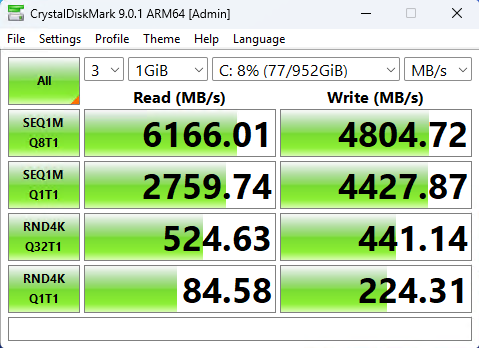
This is a peppy little PC. It blasts through a restart cycle (restart, boot, Windows startup, desktop) in 30-35 seconds right now. CrystalDiskMark shows decent but not killer numbers from the OEM Samsung MZVL81T0HDLB-00BLL 1TB PCIe x4 SSD:
 During initial setup, I was able to download and install what I needed without experiencing any delays or noticeable (local) lag. A quick trip into DriverStore Explorer (RAPR.exe) showed only two out-of-date drivers amidst a collection of 269 items (1.24 GB total size: fairly small). The OS was pretty much up-to-date, but I did have to kill and clean up McAfee (which Lenovo ships pre-installed in trial form). Lenovo Vantage didn’t show an update button, so I had to download and install the Service Bridge and Lenovo Update to check the device to make sure everything was caught up (it was).
Net-Net: Nice But No Powerhouse
Whaddya expect for US$550? It’s pretty much on precise par with the ASUS Zenbook A14 I just picked up (for the same price, give or take, though the ASUS offers 2 USB4 capable USB-C ports at Best Buy). It looks like an eminently capable mini-desktop for run-of-the-mill users who don’t need lots of horsepower or storage space.
But so far, the Neo 50q seems like a great choice for SOHO and plain-vanilla home users. My wife has had aDell OPtiplex 7080 for 5 years now and loves it (curiously, it too qualifies as a “1L” mini-PC). I’m sure she would feel likewise about the Neo 50q, too.
As I get to know this PC better, I’ll write more.It’s been a small and quiet joy to set up and learn about so far…

