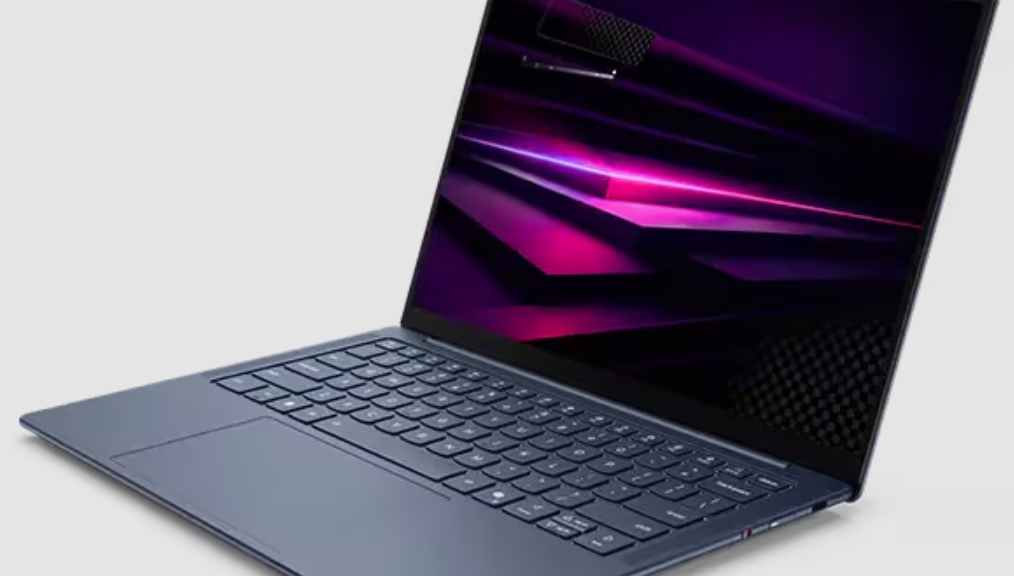
The other day I said it was coming. Yesterday, it arrived at my door about noonish. Today, I want to share my first impressions. TLDR version: I expected a lot from the Snapdragon X2, and I wasn’t disappointed. In today’s post, I’ll describe Lenovo Yoga Slim 7x Gen 11 unboxing & setup. In subsequent posts I’ll go into more detail. Here goes…
Digging Into Yoga Slim 7x Gen 11 Unboxing & Setup
Lenovo’s getting pretty good at the notion of low-footprint, low-carbon packaging and delivery. The box includes 2 eggshell carton style cradled for the laptop, a bamboo fiber sleeve for same, a cardboard holder for the one-piece 65W brick, which comes wrapped in a disposable paper sleeve. That last is black, and easy to miss: I didn’t even notice it until I checked it for the power rating info. Good job, packaging team!
I jostled the power switch (right edge of keyboard deck) as I picked up the unit, and it came right up with a full charge. I’m happy to report that “instant-on” remains as fast and reliable on X2 models as it was on their X1 predecessors. I logged right into the Lenovo review account and got going, and jumped into the setup process. That has its own story (complete with interesting bumps in the road). First, let me offer a table to compare Snapdragon X1 and X2 laptops:
Snapdragon X1 vs. X2: Good Gets Better
The key points to absorb from the following info are: more and faster cores, more cache, DX12 Ultimate, 80 TOPS NPU, PCIe 5.0. This laptop is noticeably faster than my 8 core Ryzen 7 5800X desktop with 64GB RAM, especially on CPU-intensive tasks. Impressive!
| Spec | Snapdragon X Elite (X1) | Snapdragon X2 Elite (X2) |
|---|---|---|
| Launch | May 2024 | September 2025 |
| CPU Architecture | Qualcomm Oryon v1 (Hamoa) | Qualcomm Oryon v3 |
| Process Node | TSMC 4nm | TSMC 3nm (N3X/N3P mix) |
| Transistor Count | ~20 billion | ~31 billion |
| Max CPU Cores | 12 (homogeneous, 3 clusters of 4) | 18 (12 Prime + 6 Performance) |
| Peak Single-Core Boost | 4.3 GHz (X1E-00-1DE dev SKU) | 5.0 GHz (X2E-96-100 Extreme) |
| All-Core Sustained Clock | ~3.8 GHz | ~3.4–3.6 GHz (more cores to feed) |
| CPU Cache (L2+L3) | 42 MB L2 | 53 MB L2 + 9 MB L3 |
| GPU | Adreno X1-85; 4.6 TFLOPS; 1,500 MHz | Adreno X2-90; up to 1,850 MHz |
| GPU API Support | DX12 (not DX12 Ultimate) | DX12 Ultimate |
| NPU (AI TOPS) | 45 TOPS (Hexagon) | 80 TOPS (Hexagon, 64-bit NPU) |
| Memory Type | LPDDR5x-8448 | LPDDR5x-9523 |
| Memory Bandwidth (peak) | ~136 GB/s | 152–228 GB/s (SKU-dependent) |
| Memory Bus Width | 128-bit | 128-bit |
| USB | USB 4.0 / Thunderbolt 4 | USB 4.0 x3 / Thunderbolt 4 |
| PCIe for NVMe | PCIe 4.0 (up to 7.9 GB/s) | PCIe 5.0 |
| Display Output | Up to 3x 4K 60Hz | Up to 3x 5K 60Hz |
| Wi-Fi | Wi-Fi 7 (HBS Multi-Link) | Wi-Fi 7 (HBS Multi-Link, enhanced) |
| Bluetooth | Dual BT (Snapdragon Sound) | Dual BT (Snapdragon Sound) |
| 5G | Optional | Optional (up to 10 Gbps peak) |
| Security | Qualcomm SPU + Microsoft Pluton | Qualcomm SPU + Microsoft Pluton + Snapdragon Guardian |
| Copilot+ PC | ✅ (inaugural platform) | ✅ (enhanced) |
| Emulation Performance | x86-32 and x86-64 via Prism | Improved Prism; more native apps available |
| TDP / Power Envelope | Up to ~80W (peak) | Comparable; better perf-per-watt at 3nm |
| Notable SKUs | X1E-84-100 (most common); X1E-80-100; X1E-78-100 | X2E-96-100 Extreme; X2E-88-100; X2E-84-100; X2E-80-100; X2 Plus (6–10 core) |
| Review Slim 7×2 SKU | — | X2E-84-100 (12 Prime + 6 Perf; 4.7 GHz boost; 152 GB/s) |
One Small Little Gotcha…
My only real disappointment with the review unit was that it shipped to me running Windows 11 Home. That’s because I rely on RDP (through Remote Desktop Connection, aka mstsc.exe). Thus, I had to upgrade to Windows 11 Pro to make that work. However, this is a minor beef, and one easily remedied at purchase time for an extra US$50.
Here’s the configuration Lenovo sent (aside from the already-mentioned OS): X2E Elite 88-100 CPU, 32GB RAM, 1TB PCIe Gen4 SSD, 1920×1200 OLED display. As configured, the Lenovo store currently lists the price at US$1,795.49. Comparatively speaking, I believe this is a good deal, given current prices for RAM and SSD.
Setting Up the Yoga Slim 7X Gen 11
Things got interesting right away. I made a misstep and associated my MSA with the Lenovo review account — not smart. As a result, I ran a factory reset to see what would happen. Indeed, it took about 22 minutes all told (pretty darn fast, AFAIK). That put me back into the base OOBE for Windows 11. Then, I burned an MVP key to upgrade from Home to Pro, which went amazingly fast — less than 2 minutes from hand-off to the Pro desktop. Overall, given intense non-gaming workloads, this unit screams!
Along the way, I learned that you can target ARM CPUs in WinGet using the --architecture ARM parameter and argument during installs. That helped me get the right versions of CrystalDiskMark, PowerShell 7, and a couple of other odds and ends up and running on the X2 laptop. In addition, I used a combination of PatchMyPC Home Updater and WinGet to get all the usual tools and applications up and running. On the whole, that process took about 2 hours and was pretty enjoyable.
I did hit a typical snag in getting RDP to work. Specifically, I was unable to get into the laptop (machine name: Yog7X2) using a Microsoft Account (MSA), despite various well-known fixes — namely, requiring Hello compliance for all logins, and making sure to sign in with the password at least once to get the MSA registered with the LSA. Consequently, I resorted to the equally well-known workaround of setting up a local account and using that instead.
First Impressions: Bedazzled and Enthused
I’ve actually purchased two Snapdragon X1 laptops for our household already (in 2025). For instance, I own an ASUS Zenbook A14. Meanwhile, my son has a ThinkPad T14s Gen 6 that we bought to replace a ThinkPad X390 after its display cracked. Obviously, I’m already enamored of the value proposition: decent performance, great battery life, and a slim, portable form factor. Indeed, both of us emphatically like those older models.
Surprisingly, the Slim 7X Gen 11 runs noticeably faster than most of the fleet here at Chez Tittel. To be clear, that fleet includes high-end Lenovo models like the ThinkPad P16 Gen3 Mobile Workstation and the ThinkStation P3 Ultra — so that’s a significant statement.
In addition, the unit is incredibly light at 1.17 kg (2.58 lbs). At the same time, even the low-end OLED display is brilliant and easy on the eyes. Astonishingly, reviews published so far (it’s early in the life cycle) put battery life in a range from 25 hours (mixed real-world usage) to 31 hours (local video playback), with Lenovo claiming “up to 29 hours” in its CES 2026 announcement. Naturally, I’ll see how that pans out in my own testing and usage.
All in all, this is a machine I wanted to see and use. Now that I’ve gotten started, I’m favorably disposed. Furthermore, I’m expecting my ardor and appreciation to grow as I get more time with this snazzy little laptop. Stay tuned: I plan to post three more items about this device in the next two weeks.
One More Things (Added 1 Day Later)
The Yoga Slim 7X Gen 11 also offers another feature I definitely appreciate. I concur with Michael Crider’s recent PC World story that OEMs should provide USB-C ports on both sides of their laptops for ease of access to chargers and docks in cramped conditions and on on office desktops. And guess what? Lenovo provides 3 (!) USB-C ports on this model: 2 on the left side, and one on the right. Good stuff!

